


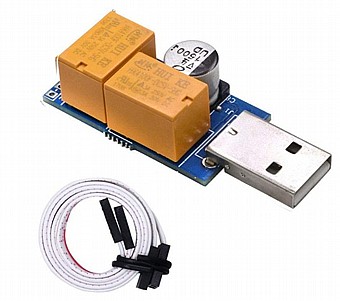
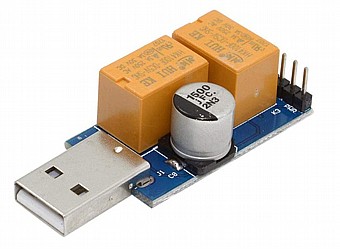
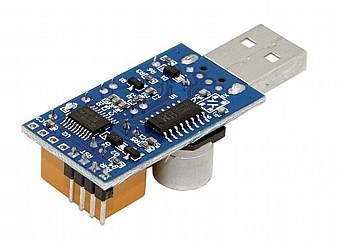
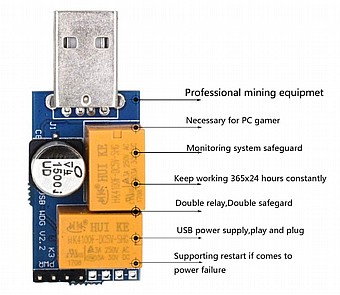
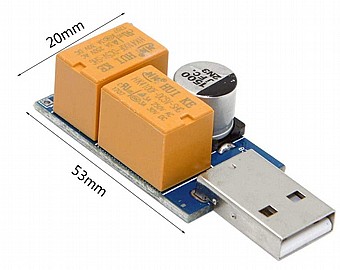

מתאם ציוד עזר USB Watchdog Timer Card Relay
- חיבור USB
- מתאים למערכות: winxp, win7, win8, win10 ועוד
- ניתן להגדיר לפי הצרכים שלכם
- מתאים ליישום על מגוון לוחות אם למחשבים (שיש בהם USB)
מוצר זה מיועד במיוחד לשימוש בכרייה, שרתים, גיימינג, מערכות ניטור וכו'.
Single-Relay Version:
Specified Program Monitoring
Scheduled Restart
Website Monitoring
Video Card Monitoring
Run Log Query
Regular restart
מבצע ₪ 69
Features:
- Applicable to a variety of computer motherboards. motherboards just need with a Type-A USB interface .
- Use for windows x86/x64 system. include winxp, win7, win8, win10 ect.
- Need to install the driver to compatible with a variety of motherboards.
- With Desktop software, It can precise monitoring the program as your need. Better than no software version.
- Reboot timeout time 10-1270 seconds.You can set up it as your need.
How to use:
Note: Some antivirus software may prevent the program running, please click "allow". Watchdog software is running, the control panel LED will flash once 1 time, then connect USB Watchdog Cable with the motherboard Reset pin. It means the computer have crashed When the control panel LED is long time bright.
1. Download the software and the drivers; https://tinyurl.com/usbwatchdog01
2. Install the driver (Before install driver, please do not connect USB watchdog with your computer, double-click "Watchdog Driver. exe", click "Install", waiting for the installation is complete.)
3. Connect USB Watchdog to computer USB port. (Connect Watchdog to computer USB port. Do not connect cable with the motherboard reset pin temporarily, because default time-out time is 3 minutes, if drive installment has not finished within 3 minutes, the USB Watchdog may send a reboot signal to system. Wait for the computer to finish the automatic recognization of the watchdog module.)
4. Connect the cable with the motherboards reset pin
5. If you want to fix the Setting, you can open the config.inf to fix.
timeout=180;//Timeout reset time can only be 10 integers, range 10-1270 seconds
TimedRestartDays=3;//Auto restart days
HttpName=;//the link which you want to watch,it will not watch if you do not fill in,such as pool.ethfans.org
AppName=;//the app you want to watch
VideoCardMonitor=1;//Do you want to watch the video card?0 not watch,1 watch
6. Start the Software.
start the USBWatchdog_V2.3x_en and configure as your need.
You need to restart the USBWatchdog software after you changed configure.
Package Include: 1* USB Watchdog Timer Card, 2* Power Cable
Features:
- Applicable to a variety of computer motherboards. motherboards just need with a Type-A USB interface .
- Use for windows x86/x64 system. include winxp, win7, win8, win10 ect.
- Need to install the driver to compatible with a variety of motherboards.
- With Desktop software, It can precise monitoring the program as your need. Better than no software version.
- Reboot timeout time 10-1270 seconds.You can set up it as your need.
How to use:
Note: Some antivirus software may prevent the program running, please click "allow". Watchdog software is running, the control panel LED will flash once 1 time, then connect USB Watchdog Cable with the motherboard Reset pin. It means the computer have crashed When the control panel LED is long time bright.
1. Download the software and the drivers; https://tinyurl.com/usbwatchdog01
2. Install the driver (Before install driver, please do not connect USB watchdog with your computer, double-click "Watchdog Driver. exe", click "Install", waiting for the installation is complete.)
3. Connect USB Watchdog to computer USB port. (Connect Watchdog to computer USB port. Do not connect cable with the motherboard reset pin temporarily, because default time-out time is 3 minutes, if drive installment has not finished within 3 minutes, the USB Watchdog may send a reboot signal to system. Wait for the computer to finish the automatic recognization of the watchdog module.)
4. Connect the cable with the motherboards reset pin
5. If you want to fix the Setting, you can open the config.inf to fix.
timeout=180;//Timeout reset time can only be 10 integers, range 10-1270 seconds
TimedRestartDays=3;//Auto restart days
HttpName=;//the link which you want to watch,it will not watch if you do not fill in,such as pool.ethfans.org
AppName=;//the app you want to watch
VideoCardMonitor=1;//Do you want to watch the video card?0 not watch,1 watch
6. Start the Software.
start the USBWatchdog_V2.3x_en and configure as your need.
You need to restart the USBWatchdog software after you changed configure.
Package Include: 1* USB Watchdog Timer Card, 2* Power Cable


